Integrating Digital Technologies in Theatre/Drama Education
→ The teacher is the deciding factor; design for teacher creativity and confidence, and for schools with little to no tech budget.


The Afternoon Edition · FEATURE
TODAYAI PRODUCT · UX/UI DESIGN · TEAM PROJECT

An AI-powered platform that helps teachers turn a lesson into a classroom play.
IN PROGRESS · FALL 2026
01
Every teacher can put on a play
Our client, Rory O’Malley, is an actor and Tony Award nominee who brings theatre into his son’s classrooms to help kids learn. He wants every teacher to be able to do what he does. But most teachers don’t have theatre skills or experience, and don’t have time to learn.
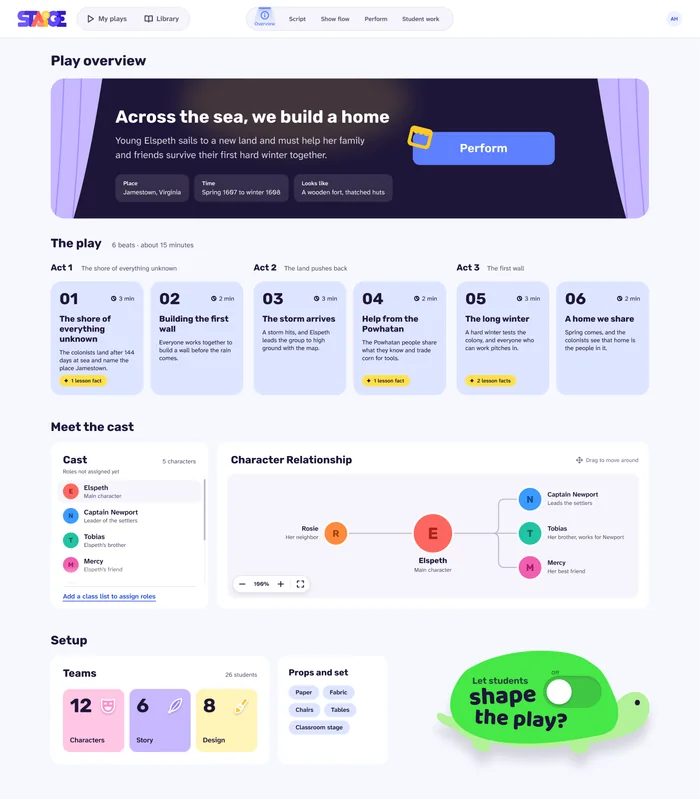
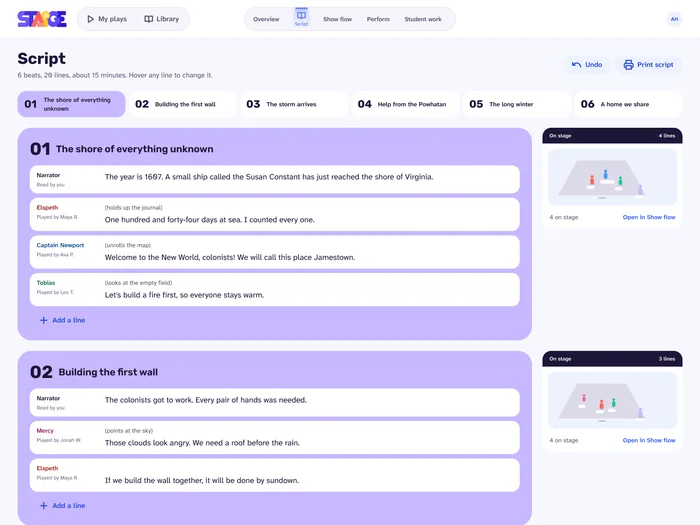
STAiGE starts from what a teacher already has, her lesson, and turns it into a play her class can perform: a script, a stage map with movement cues, and show-day screens for her and her students.

How might technology help teachers use drama in class, while keeping the creative, physical and collaborative nature of theatre?
THE THREE PILLARS · TEAM DESIGN LOGIC
The teacher’s goals, content, required facts and classroom setup.
The AI drafts the whole play, and the teacher can change or edit anything. Students can shape the play too, if the teacher turns that on.
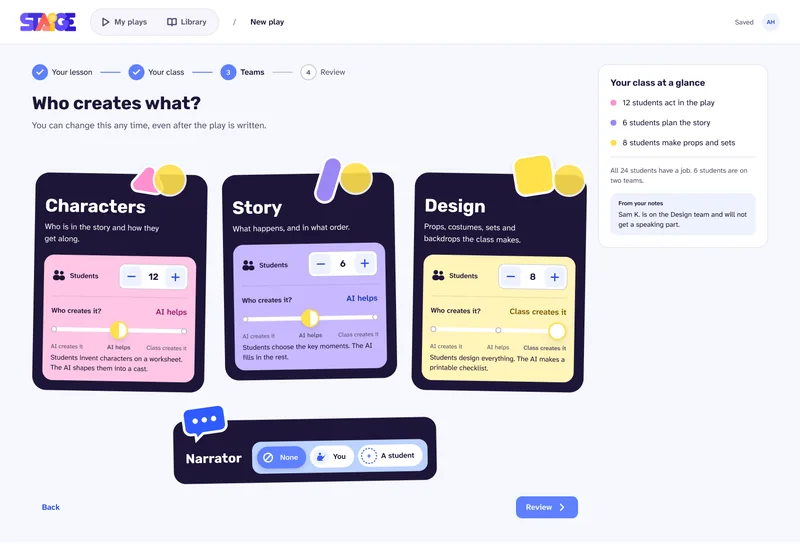
Rory O’Malley’s son loves writing but not performing. Writing, directing and design are all ways to take part in theatre, so teachers choose who creates what. See how teachers set this up
A script, show flow, editable stage maps and show-day screens.
02
Designing for teachers with no theatre training
I did early-stage research on how to design the system so teachers can actually use it.
Technology in theatre and drama education
→ The teacher is the deciding factor; design for teacher creativity and confidence, and for schools with little to no tech budget.
→ The teacher is the deciding factor; design for teacher creativity and confidence, and for schools with little to no tech budget.
AI ethics and literacy for children and teachers
→ Give teachers an easy, visible way to reject or override an AI suggestion.
→ Give teachers an easy, visible way to reject or override an AI suggestion.
Human-AI co-creativity
→ People collaborate best when they can always edit, reject or build on what the AI made; small cues, like a short “thinking” pause and color-coded status, build trust.
EXISTING PRODUCTS · REVIEWS
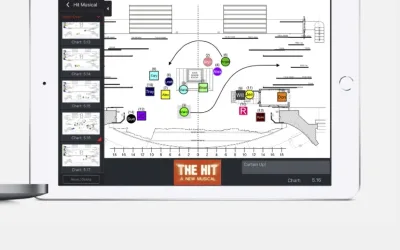
Plan actors’ movement on a virtual stage.
→ A visual stage map beats a written note.
AI lesson plans for drama teachers.
→ “Type what you need, get a draft” is the right AI interaction for a busy teacher.
AI reads the other part so actors can practice lines.
→ AI as a simple scene partner.
From story to performance in five stages. AI drafts the first three: story (brainstorming), script (story to scenes to script) and scene (adapts to age, cast and time). Then the teacher takes over, and people perform the last two: stage (timing, movement) and performance (live performance).
So: AI drafts, people perform.
Real inputs: California grades 1–4 curriculum research and real grade 4–5 lesson plans (math, history), used to test the system.
DESIGN PRINCIPLETeachers remain in control. Everything the AI makes must be understandable and editable, never a black box.
03
Four steps to a play
Agnes, our system designer, suggested what content and teacher inputs each screen needed. I designed the interface in Figma and iterated it through every round of testing.
ITERATION
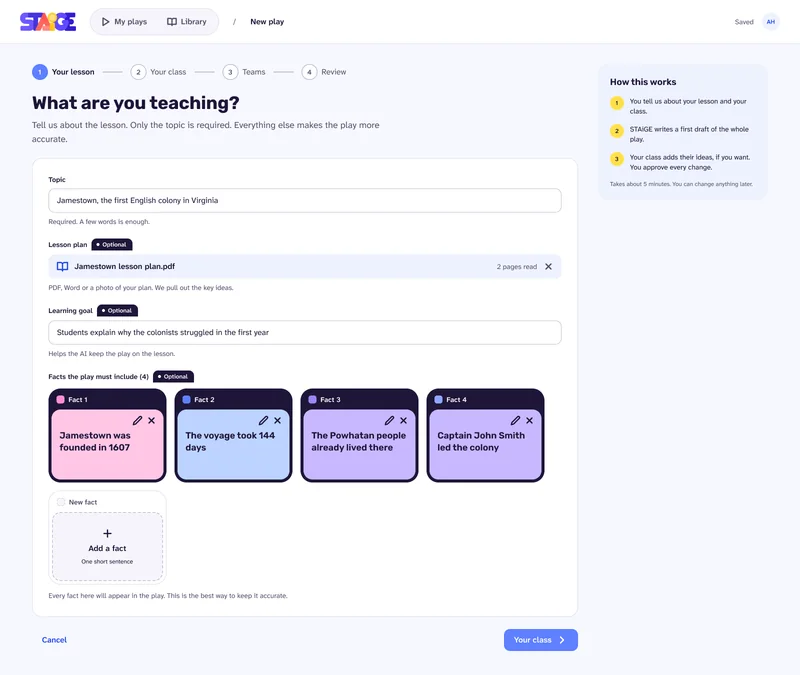
V1 · proof of concept
I built the first version of the interface as a proof of concept. Our programmer implemented it in Unity, and testing with ETC faculty showed the AI could turn a lesson into a full play. Only then did we build the STAiGE brand into the interface.
For each page of V2, I explored three to four low-fi directions before choosing one. I used Claude as a design tool to build the drafts quickly: I set the direction for each one (layout, hierarchy and content), then compared them, chose one and refined it into the final design.
A
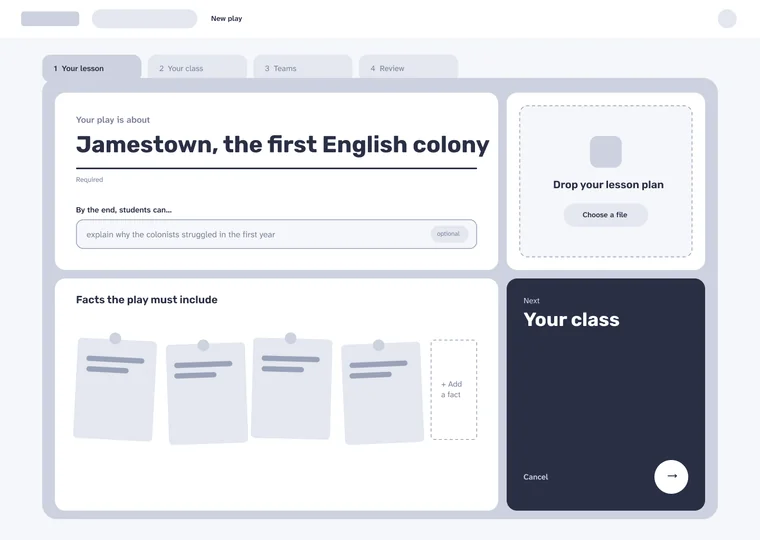
The topic is typed like the title of a play, big and centered. The lesson plan drop zone sits beside it as a shortcut. Facts are a shelf of cards; the steps sit in a bar at the bottom.
B
Two big doors decide how you start: upload a lesson plan or type it in. Short inputs on the left, and a play brief on the right fills in as you go. Steps run down a rail on the left.
C
The whole step is one board of tiles in different sizes, like a teacher’s planning board. Facts are sticky notes; the steps are folder tabs on top, and Next is a tile of its own.
D Chosen
Everything lives in one folder with the steps as tabs. The topic is the play’s title, the lesson plan drop box sits on the right, facts are pinned below, and Next is its own dark tile.
A clear input hierarchy: each input sits in its own card, marked required or optional, so teachers know where to type, what’s required and what isn’t, and aren’t overwhelmed by everything at once.
Folder tabs for the four steps, matching the school setting.
Animal Next buttons: Agnes drew the five characters; I designed their final look in the interface and turned them into the Next buttons, so each step has a friendly, recognizable way forward.
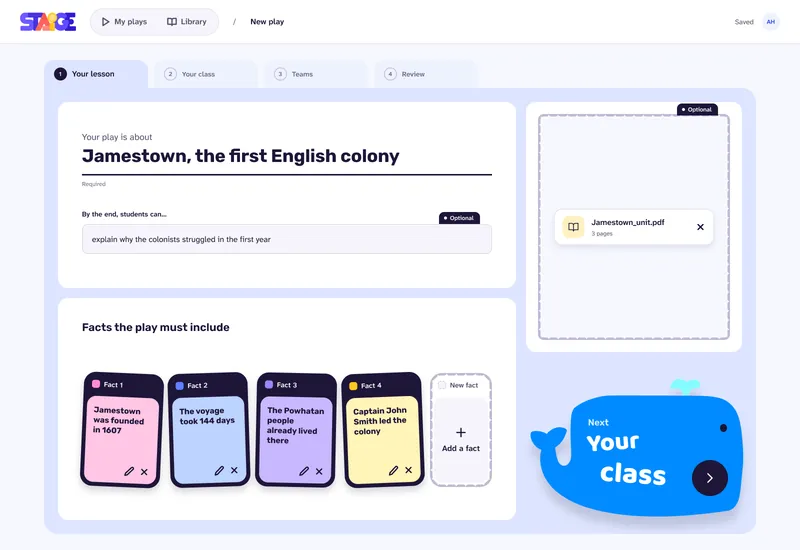
Animal characters drawn by Agnes; I designed their final look and turned them into the Next buttons.
DECISION 1
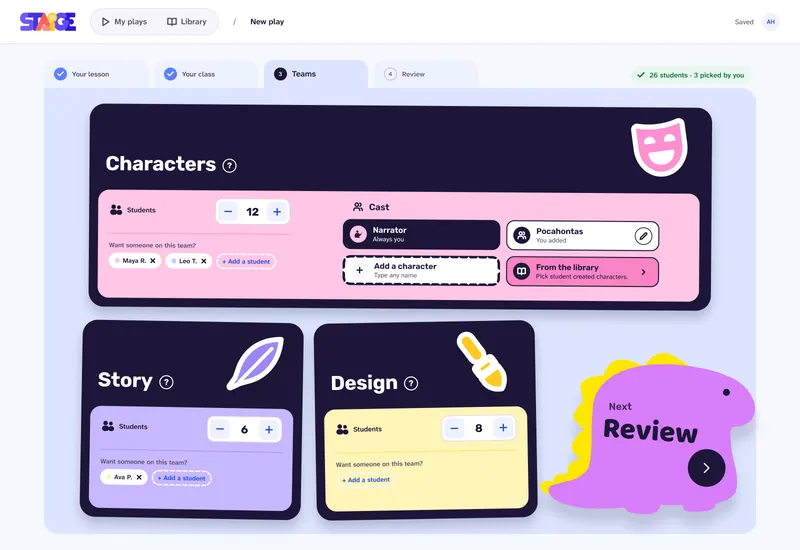
From her home page, a teacher clicks Start a new play and answers four steps: her lesson, her class, who creates what, and a quick review. One click, and the play is ready.
Step 1 of 4 · Her lesson: the goals, the content and the facts the play must include.
I directed this animation, deciding what it shows, how it moves and which elements appear, and built it in Figma with Claude. Animal characters drawn by Agnes.
Why: keeps setup clear and not overwhelming for teachers with little time.
DECISION 2
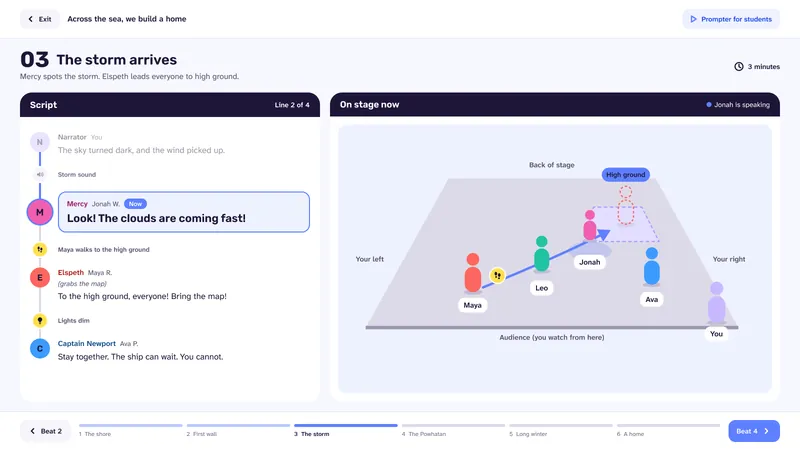
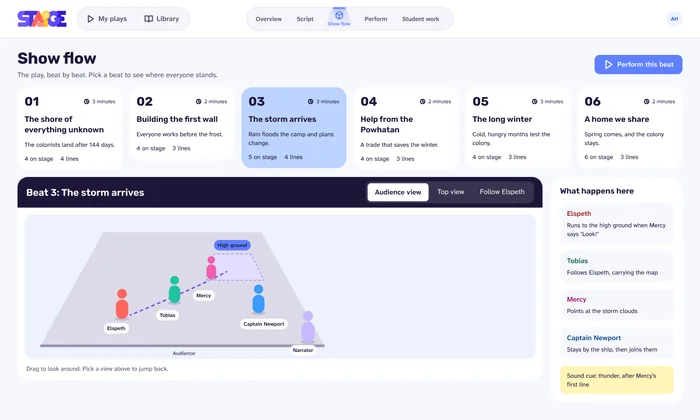
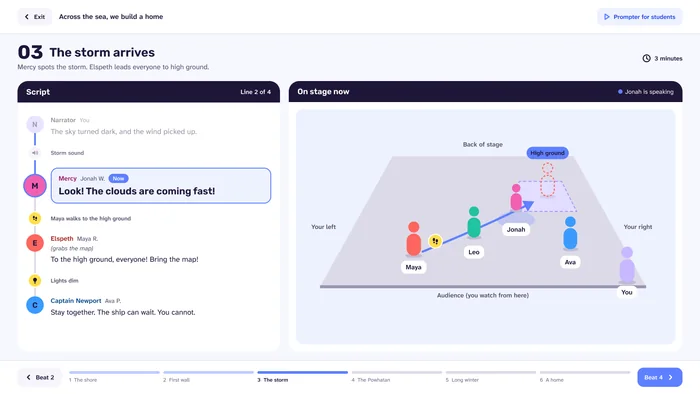
The director’s view holds everything the teacher needs to run the show: all the action cues and an overview of every beat’s lines, so she can see the whole play and control it at a glance.
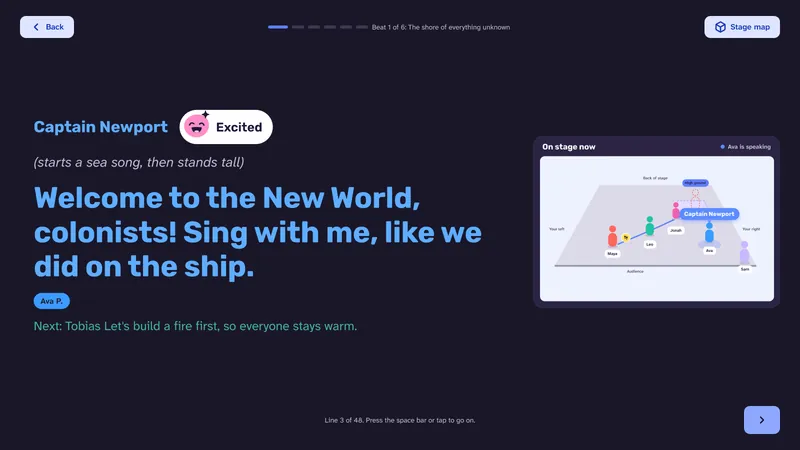
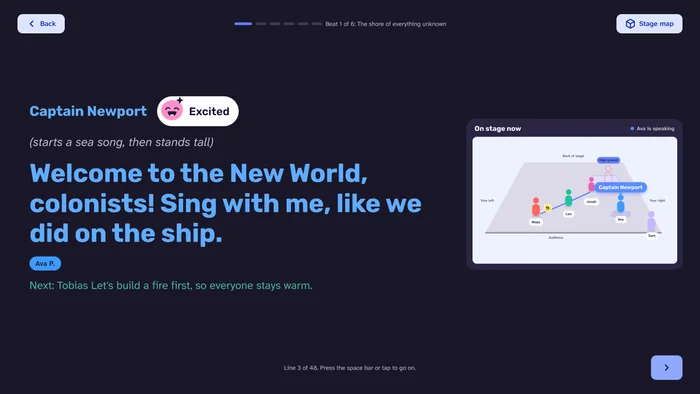
The student view shows only what a performer needs: one big line at a time, in their character’s color.
Why: in our school visits in Pittsburgh, we confirmed every classroom has at least two screens, the teacher’s laptop and a projector, so the split needs no new equipment.
DECISION 3
Each line in the student view carries an emoji showing the emotion, from a set of 13 expressions.
 Happy
 Excited
 Brave
 Proud
 Calm
 Curious
 Surprised
 Worried
 Scared
 Sad
 Angry
 Silly
 Tired
Design rule for the set (from my Figma sheet): one face per line, big shapes, one clear clue each, readable from across the room.
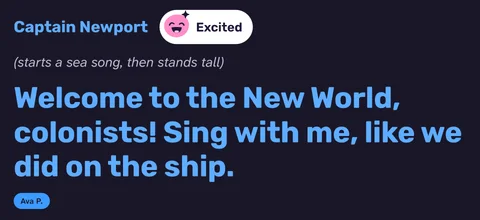
Why: students who aren’t actors can see how to say the line, not just what to say.
Evidence: at Dalton, students said the emoji on each line told them how to act it.
DECISION 4
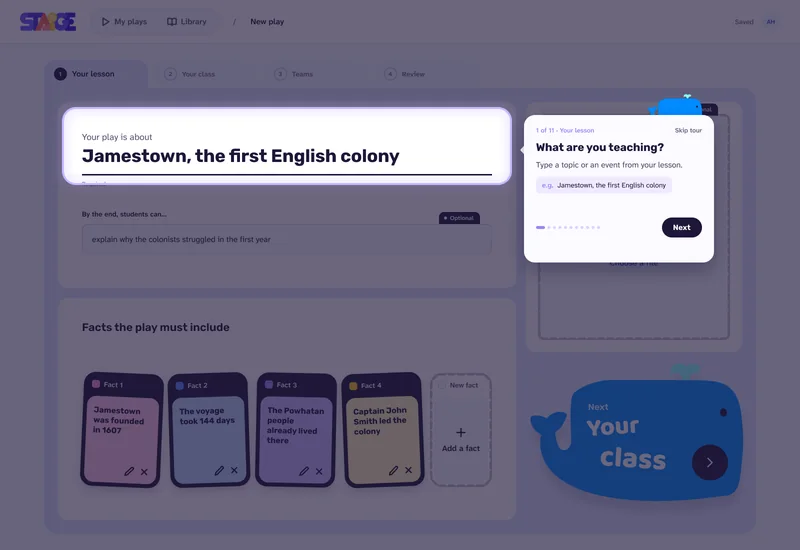
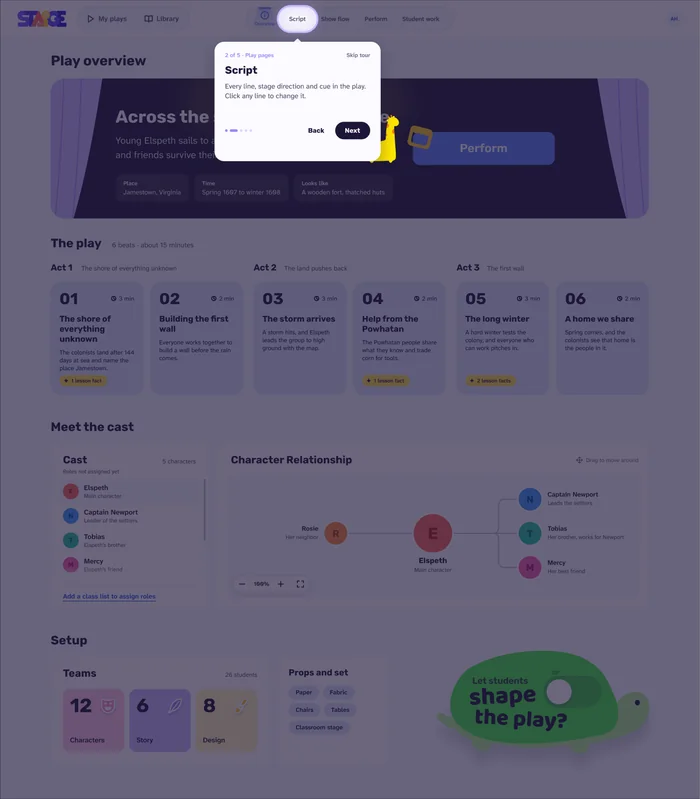
Screen 1 of 2: Setup, step 1 of 11
The first time a teacher starts a play, a short guided tour (11 steps through setup, 5 through the play pages) points to each input and each menu, with “1 of 11”, Back/Next and Skip tour.
Why: so teachers know where to type and where the menus are, and don’t get lost the first time.
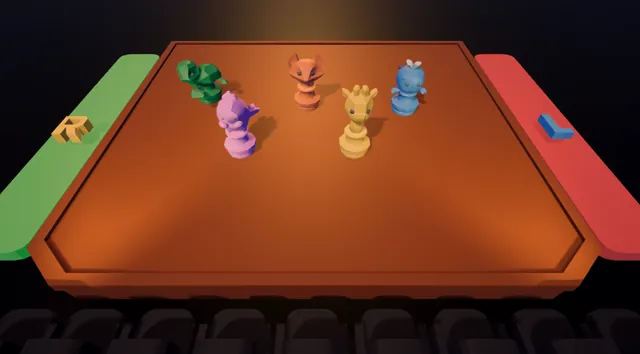
Animal game pieces that match our animal characters, after a playtest with a younger learner showed visuals affect how comfortable kids feel.
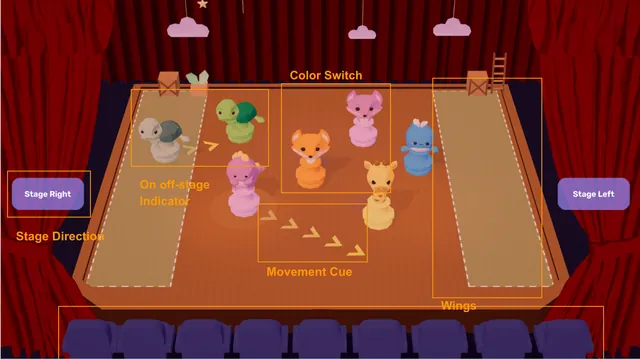
After the mid-semester faculty review: feet instead of meters, a grid, audience seating, left and right wings, clearer animal game pieces, movement cues and on/off-stage indicators.
Stage map by Ailun, our 3D artist.
04
Feedback shaped STAiGE
PROBLEMClickable and non-clickable elements looked the same
FIXclearer visual distinction
PROBLEMLong pages hid content
FIXscrolling cues
PROBLEM“Optional” looked like a button, and the character page was hard to understand
FIXsimpler hierarchy and labels
PROBLEMTeachers had to read the full script to understand the play
FIXa high-level story overview first
PROBLEMToo many options
FIXremoved the option to make the play a musical, and simplified several elements
SCHOOL VISITS · PITTSBURGH
Huston Middle School and Bon Air Elementary. Teachers who tested the demo found it user friendly; both schools offered classroom trials.
Classroom limits we learned: older equipment, frequent projector shutdowns, little craft material.
CARNEGIE MELLON ETC PLAYTEST DAY · OCT 31
Playtesters responded positively to the UI and visual design and found the workflow and guidance clear.
Issues: generation took about 3 minutes, with two failures.
NEW YORK · DALTON SCHOOL

Dalton teacher Rory Boyd (no relation to our client, Rory O’Malley) brought his grade 7 class to perform a play about the Gilded Age. The class had only watched one video about it.
From his lesson plan and facts, STAiGE generated “The Telegram at the Curb”: 6 beats, 72 lines, about 15 minutes, set in New York in 1890.
With no rehearsal, the class performed the whole play. Mr. Boyd directed from the director’s screen; students read from the prompter and followed the stage map for where to stand and move. Nobody struggled with the interface.
Learning goal met: asked afterwards what they learned, students could point out facts about the Gilded Age and its people from performing the play.
“It was a huge surprise to our whole team how well it went.”
FROM THE GENERATED SCRIPT · OPENING NARRATION
NARRATOR: New York City, 1890: the Gilded Age. Fine homes and crowded tenements share one busy city. The street smells of coal smoke and horses.
WHAT THE STUDENTS ASKED FOR
05
Next, before December 8
IN PROGRESS
DEMO
Animal characters designed by Agnes; final 2D cutouts drawn by Angie He. Stage map by Ailun.